> For the complete documentation index, see [llms.txt](https://dev.pointr.tech/llms.txt). Markdown versions of documentation pages are available by appending `.md` to page URLs; this page is available as [Markdown](https://dev.pointr.tech/features/analytics/integrating-bi-tools.md).
# Integrating BI Tools
Connect external BI tools to Pointr Cloud analytics data stored as JSON in Azure Storage Containers, including access options and folder structure.
## **Integrating Your BI Tool with Pointr Cloud Analytics Data**
Our platform is designed to facilitate your business growth by seamlessly integrating insights into your operations. Pointr Cloud analytics data is stored in JSON format within Azure Storage Containers, a service provided by Microsoft Azure.
This document provides an overview of Azure Storage, explains what containers are, and includes links to official documentation and guides for integrating popular BI tools with Azure Storage as a data source.
#### **What is an Azure Storage Account?**
An Azure Storage Account is a scalable and secure cloud-based storage solution provided by Microsoft. It allows you to store data objects like files, blobs, queues, and tables. Azure Storage is highly reliable, cost-effective, and designed to meet the needs of modern applications.
**Key Features:**
* **Massive Scalability:** Supports large-scale data storage and retrieval operations.
* **Versatile Storage Options:** Includes Blob Storage for unstructured data, File Storage for file shares, Queue Storage for messaging, and Table Storage for structured NoSQL data.
* **Global Accessibility:** Provides fast, dependable access to data for users worldwide.
These features make Azure Storage suitable for a variety of use cases, ranging from backups and disaster recovery to advanced data analytics and machine learning.
#### **What is an Azure Storage Container?**
An Azure Storage Container is a logical container for organizing blobs (binary large objects) within a storage account. It functions like a folder in a file system, grouping related blobs together, simplifying management, and allowing for precise access control.
**Key Features:**
* **Scalability:** Handles vast amounts of data, supporting large-scale analytics and processing.
* **Accessibility:** Access via REST APIs or SDKs in multiple programming languages.
* **Security:** Offers granular permissions through Azure Active Directory and Shared Access Signatures.
* **Durability:** Ensures high availability with redundant data storage across multiple locations.
### **How to Connect to Your Azure Storage**
You can view your analytics files using the [Azure Storage Explorer](https://azure.microsoft.com/en-us/products/storage/storage-explorer/).
Please contact your Pointr PM/Support to provide you with the Azure Storage Container details, which you can use to connect your BI tool to your analytics data storage.
Please visit the official documentation links for [Microsoft Azure Blob Storage ](https://learn.microsoft.com/en-us/azure/storage/)and [Azure Storage Explorer](https://learn.microsoft.com/en-us/azure/storage/blobs/quickstart-storage-explorer) for more information.
{% hint style="info" %}
To utilize your BI tool with our analytics data, set it up to connect to the Azure Storage Container containing the data. Azure Storage offers several authentication methods, including access keys, shared access signatures, and Azure Active Directory integration, ensuring secure and reliable connections.
For further details on integrating the Azure Storage Container with your BI tool, please consult its official documentation.
{% endhint %}
### **Azure Storage Container Folder Structure**
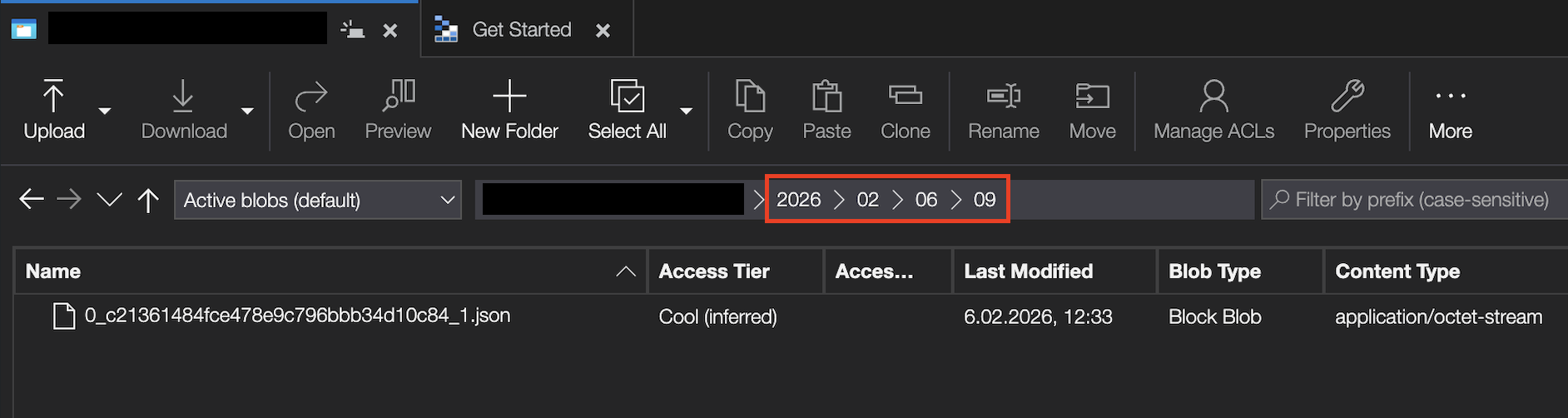
Pointr Cloud analytics data is saved in JSON format within an Azure Storage Blob Container. When an analytics event arrives, it is organized in a hierarchical folder structure using the yyyy/MM/dd/hh pattern in UTC , as illustrated below.
The generated JSON files will be located in the day folder. Depending on how many events there are, you may find one or several JSON files saved for a single day.
---
# Agent Instructions
This documentation is published with GitBook. GitBook is the documentation platform designed so that both humans and AI agents can read, navigate, and reason over technical content effectively. Learn more at gitbook.com.
## Querying This Documentation
If you need additional information that is not directly available in this page, you can query the documentation by asking a question.
Perform an HTTP GET request on the following URL with the `ask` and `goal` query parameters:
```
GET https://dev.pointr.tech/features/analytics/integrating-bi-tools.md?ask=&goal=
```
`ask` is the immediate question: it should be specific, self-contained, and written in natural language.
`goal` is what the user is ultimately trying to achieve, the reason they need the answer. Sharing it helps GitBook give you a better, more relevant answer. A goal is most helpful when it describes the outcome the user wants rather than restating the question. For example, with `ask=how do I create an API token`, a goal like `automate deployments from our CI pipeline` lets GitBook tailor the answer to that use case.
The response will contain a direct answer to the question and relevant excerpts and sources from the documentation.
Use this mechanism when the answer is not explicitly present in the current page, you need clarification or additional context, or you want to retrieve related documentation sections.